Sleep tracking can help you notice routine patterns when each entry is treated as context rather than a diagnosis. Levvi brings together sleep-hour settings, a subjective daily entry, and, when you grant permission, data imported from health platforms. These sources answer different questions: what you planned, how you felt, and what a device was able to estimate.
The three sources of information
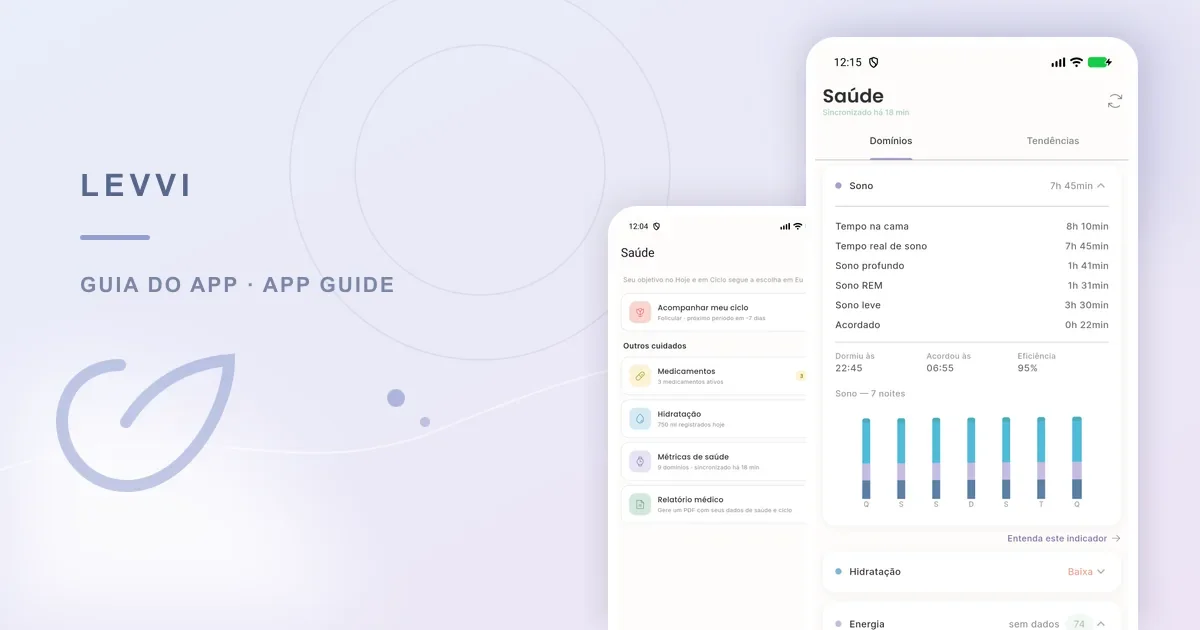
Sleep and wake settings live in the app settings and provide a reference schedule. The daily cycle entry can include your perception of sleep quality. The Health Hub can show duration, stages, and charts when objective data has synced. A subjective entry is useful without a watch, while a device chart cannot describe the whole experience of a night.
Availability depends on permission and the connected source. On Android, Levvi may use Health Connect; on iPhone, the corresponding integration is Apple Health. The app needs explicit authorization and compatible data. Without permission, a connected source, or data for a given night, the dashboard may be incomplete.
How to set up and record sleep
Set sleep and wake hours in settings so your reference is consistent. Then, in the daily cycle entry, record how the night felt and a factor that might add context, such as shift work, travel, pain, or a child waking up. To review imported data, open the Health Hub and check that the connection is active before reading the charts.
- Check the date before saving an entry.
- Keep perceived quality separate from measured duration.
- Record one relevant context factor without forcing a single explanation.
- Look for patterns across several days instead of one isolated night.

A Levvi example
Rafaela sets a reference schedule and, after a short night, marks perceived quality as low in the daily entry. The next day, Health Connect syncs duration and stages. She notices that the measured duration was longer than she expected but still woke up tired. That contrast is useful: device data and her experience complement each other. She records travel that week as additional context.
Use the history to prepare a conversation with a professional or to review habits you want to test. Do not use one chart to conclude that you have a sleep disorder or to automatically attribute a cycle change to sleep.
Limits and troubleshooting
Sleep stages and duration are estimates from the platform that supplied the data. Levvi does not validate sensor accuracy, diagnose insomnia, or turn an association between sleep and cycle into cause and effect. Seek professional assessment for severe daytime sleepiness, breathing pauses during sleep, persistent distress, or another health concern.
If the dashboard has no data, check read permission in the health platform, the selected date, the connection, and whether the source actually has records. If only part of a night appears, synchronization or device data may have a gap. Do not make up values to fill it; record your own perception separately.
Frequently asked questions
Do I need a watch? No. You can set hours and record your perception without a device. Why are stages missing? They depend on a compatible source, permission, and available data. Does Levvi calculate a clinical relationship between sleep and cycle? No. It helps organize records; clinical interpretation needs context and professional guidance.