
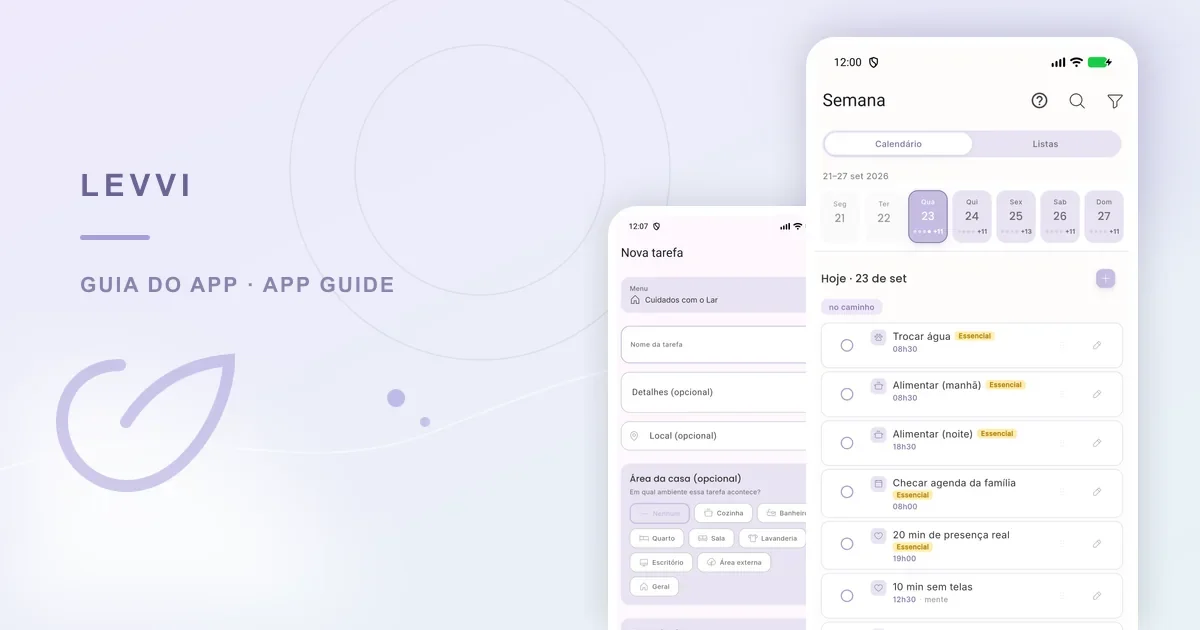
A useful list should help with the next decision, rather than simply collect commitments. In Levvi, you can create tasks, choose an area, indicate the energy they require, and see the week in one place. The aim is to reduce the effort of remembering and make adjustments easier when your availability changes.
Where to find your tasks
Open Week from the bottom menu to see pending and completed actions. The central + button opens the editor for a new task. Areas include Home, Self-care, Pets, and Family, among others that may appear in your version. They organize the list; no area has a fixed priority over another.
In the weekly view, you can see the distribution and, when the current interface supports it, drag a task to another day. Use the view to spot an overloaded day or an open one, and always check the date after moving an item.
How to create a clear task
Tap +, write a name that starts with a verb, and add details only when they help execution. Choose an area, set recurrence only if the action truly repeats, and select the energy level. “Gather documents for the appointment” is easier to act on than “deal with health”. If a task is large, split it into smaller steps.
- Use a specific name that is easy to recognize in the list.
- Choose the area that will make the task easiest to find later.
- Use Essential, Keeps the rhythm, or If energy is left over according to the expected effort.
- Set recurrence only for actions that really repeat.
- Review the day and reschedule what does not fit instead of hiding the delay.

A realistic example
Camila has an appointment on Friday. She creates “gather appointment documents” as Essential in the relevant area, and “organize my bag” as Keeps the rhythm. On Thursday she has little energy and moves the second task to Saturday. Both tasks remain visible, and the priority helps her choose what to do first without turning the list into a demand.
The garden view can make progress more pleasant, but it is a visual representation. Do not rely on a perfect streak, streak freeze, or another rule that is not present in the current interface. The value is choosing and completing actions that genuinely support your routine.
Limits and troubleshooting
Levvi does not decide your productivity or know how much effort a task requires. Energy levels are planning aids and can mean different things to different people. If the list feels heavy, reduce the number of actions and ask for support when needed.
If a task is missing, check the date, filters, and area. If recurrence created unexpected items, edit the rule or carefully remove the original task. After dragging an item, reopen the week to confirm its date.
Frequently asked questions
Can I use tasks for health appointments? Yes, for organizing reminders and preparation; they do not replace care or a prescription. Do I need all three energy levels? No. Use what helps you. Can I delete a completed task? Availability depends on the version; if you need a record, consider keeping or editing it instead.