
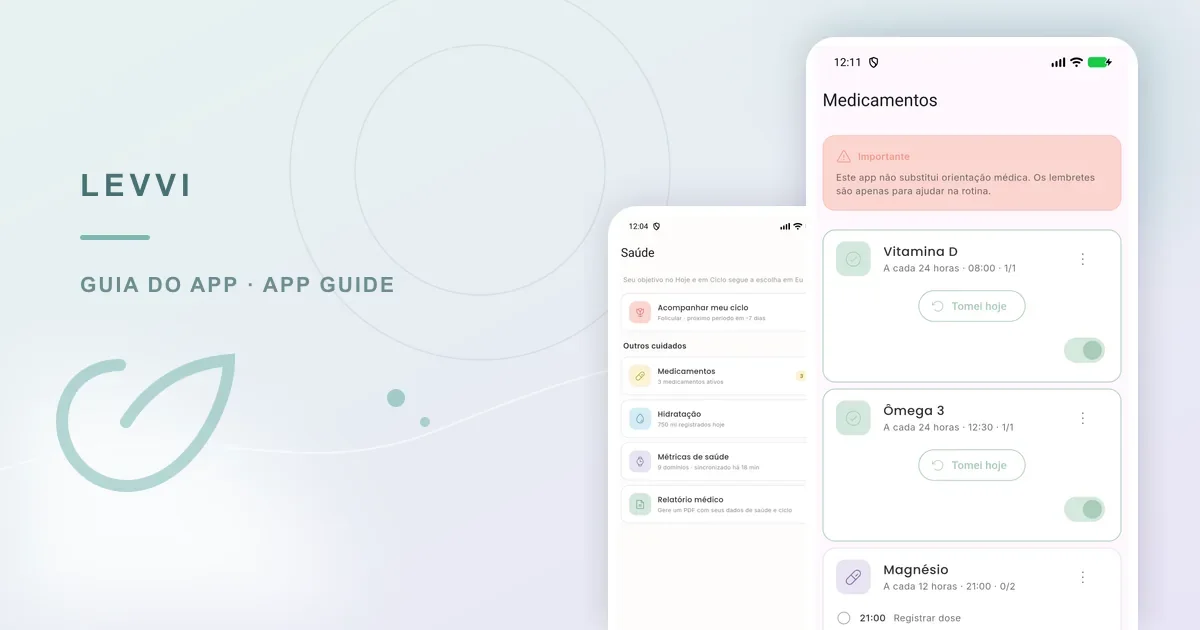
Levvi organizes medicines and reminders so you can follow a routine. It does not decide which medicine to take, which dose is right, or whether a time is clinically suitable. Confirm treatment and any change with the healthcare professional who supports you.
Open the medication area
Go to Health and tap Medications. From there, you can review saved items, add a medicine, and check configured times. Before saving, compare the name, dose, and instructions with the prescription or guidance you received.
Set up the routine step by step
Complete the fields requested by the app and choose one of its recurrence options. Levvi provides seven recurrence types to fit different routines. Review the result before finishing, especially when the treatment has specific times or more than one dose per day.
- Use a name you will recognize in a reminder.
- Check dose, unit, frequency, and times against the instructions you received.
- If the app suggests times around your sleep schedule, treat that as an organization aid and confirm clinical suitability.

Record a dose
When a reminder appears, open Levvi and use the Log dose action. Notifications must be allowed, and the app must be opened to complete the action; a system notification alone does not confirm that a dose was recorded. Tapping an existing record can reverse the action. The current feature does not provide a skipped-dose state with a reason.
A practical Levvi example
Someone takes a daily medicine in the morning. In Health → Medications, they add the name, check the prescribed dose, choose a recurrence, and review the suggested time. The next day, they open Levvi and tap Log dose on the scheduled slot. In the evening, they check the medication screen to see that today’s dose is marked, without treating the mark as proof of anything done outside the app.
Notifications, changes, and reports
If a reminder does not appear, check the system notification permission and whether the medicine is active in the app. If treatment changes, update the entry only after confirming the new instructions. The medical report is a separate area and may depend on feature access; it does not replace clinical documents or advice.
Keep the medication list reliable
Set aside a few minutes to review medicines you no longer use and times that have changed. Avoid creating duplicates just to fix a detail: check whether the existing entry can be edited and keep only the current routine. If someone helps with your care, agree on how you will check the information together. When you are unsure about a dose, do not use the app history to decide by yourself; confirm the guidance you received.
An organized list can also make it easier to explain your routine at an appointment. Still, bring the package, prescription, or official instructions when needed, because an app entry can be incomplete or out of date.
Frequently asked questions
Does Levvi choose my treatment? No. It organizes medicines and reminders. Can I rely on a suggested time? Use it for organization and confirm any time with your healthcare professional. Why did I not receive a notification? Check system permission, the saved entry, and whether the app must be opened to record the action. Can I mark a dose as skipped and add a reason? The current feature has no such state; use only the actions shown and ask your professional if you are unsure about a dose.